 Phenquestions
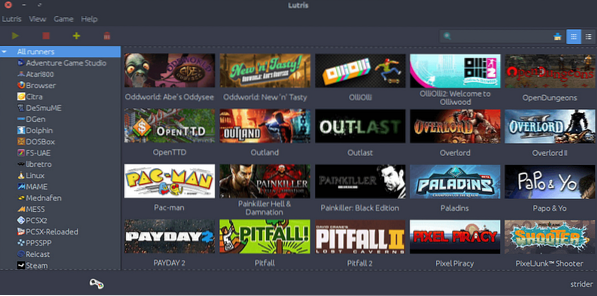
A new tutorial on how to install Lutris on Ubuntu. Lutris is an open source gaming platform for GNU/Linux. It allows you to gather and manage (install, configure and launch) all your games acquired from any source, in a single interface.
No games are sold on this platform, you have to provide your own copy of the games unless they are Open Source or Freeware. The games can be installed anywhere you want on your system, the tool does not impose anything.
Lutris Features
- Manage your Linux games, Windows games, emulated console games and browser games
- Launch your Steam and Desura games
- Community-written installers to ease up your games' installation
- More than 20 emulators installed automatically or in a single click, providing support for most gaming systems from the late 70's to the present day
- Download and play libre and freeware games
A lot more is planned. Below are what to expect in future releases:
- Humble Bundle and GOG support
- Mass import of emulator ROMs using the TOSEC database
- Game saves management
- Archive your installation files on external or network drives for a fully automatic installation procedure
- Joystick configuration GUI with keyboard mapping features
- Community features: friends list, chat and multiplayer event planning
Lutris relies on various programs referenced as 'runners' to provide a vast library of games. These runners (with the exception of Steam,Desura and Web browsers) are provided by lutris, you don't need to install them with your package manager. The followings are supported runners:
- Linux (Native games), Steam, Desura (Experimental support), Web browser, Wine, Wine + Steam, Libretro, DosBOX, Mame, Mess, ScummVM, ResidualVM, Mednafen, FS-UAE, Vice, Stella, Atari800, Hatari, Virtual Jaguar, Dolphin, PPSSPP, PCSX2, Osmose, eicast, Frotz, Jzintv, O2em, ZDoom
How to install Lutris on Ubuntu 16.04 and Ubuntu 16.10
ver=$(lsb_release -sr); if [ $ver != "16.10" -a $ver != "15.10" -a $ver != "16.04" ]; then ver=16.04; fi echo "deb http://download.opensuse.org/repositories/home:/strycore/xUbuntu_$ver/ ./" | sudo tee /etc/apt/sources.list.d/lutris.list wget -q http://download.opensuse.org/repositories/home:/strycore/xUbuntu_$ver/Release.key -O- | sudo apt-key add - sudo apt-get update sudo apt-get install lutris wine
How to Install Lutris on Debian
echo "deb http://download.opensuse.org/repositories/home:/strycore/Debian_8.0/ ./" | sudo tee /etc/apt/sources.list.d/lutris.list wget -q http://download.opensuse.org/repositories/home:/strycore/Debian_8.0/Release.key -O- | sudo apt-key add - sudo apt-get update sudo apt-get install lutris wine
How to uninstall Lutris from Ubuntu, Debian
sudo apt-get remove lutris wine